Commissioning
Inform your IT department early about your iSign purchase. IT systems are complex and varied. After the hardware is delivered, allow at least two weeks for commissioning and testing.
Introduction
iSign
iSign is a digital signage system for centrally managing and publishing content on publicly accessible screens and monitors.
Vocatis
Vocatis is an extension for the iSign digital signage system. It manages queues and visitor flows. Visitors receive a ticket and are called to the appropriate counter, workstation, or room by ticket number or identifier.
E-Paper Displays (EPDs)
E-Paper Displays are energy-efficient devices that can show static content without a continuous power supply. They use energy only when the image is updated.
Server, Player, and Client
The iSign Server is traditional server software that provides various services.
Users usually access the server through a browser. We refer to these as clients.
Playback devices also access the server and could be called clients. To distinguish them, we refer to the playback devices and their software as players.
Thus, server, player, and client are three different roles that a computer system can have in an iSign installation.
Player
The player displays content. This section covers full-featured players; see the EPDs section for E-Paper Displays.
Player PCs are usually delivered with Windows and iSign configured. We also support Linux and Android 14.
If you provide the settings requested in the checklist in advance, we can preconfigure the devices for you. If we do not receive this information, devices are delivered with the default configuration (DHCP). You can also configure the device yourself.
Players work without internet access. Internet access is needed only to display content from the internet. For remote maintenance, it is helpful if you provide TeamViewer access. RDP, for example through your server, is another option.
System Requirements
Recommended requirements for player operation (without MQTT):
| Component | Minimum requirement |
|---|---|
| CPU | 2 cores |
| RAM | 8 GB |
| Disk | 50 GB |
| Operating system | Windows 11 x64, Ubuntu 22.04, Android 14 |
Cabling
With a few exceptions, iSign player PCs need a power connection and a network connection. Unless agreed otherwise, these must be provided on site as a Schuko power outlet and a Gigabit Ethernet (1000BASE-T) port. See the product drawing for the required locations. PCs are generally supplied with a Wi-Fi module.
Domain
You can use iSign devices in a Windows domain if the operating system supports it. The customer is responsible for configuration. Group policies may affect iSign functionality and should be checked for each environment.
E-Paper Displays (EPDs)
The player software for EPDs is installed on your server.
Our EPDs connect to Wi-Fi and support both WPA2-Personal and WPA2-Enterprise authentication.
Images for EPDs are rendered on a server. This may or may not be the same machine as the iSign Server. If both components are installed on one machine, add their system requirements together.
| Component | Minimum requirement | Upgrade recommendation |
|---|---|---|
| CPU | 1 core per 400 EPDs | |
| RAM | 1 GB + 75 MB per EPD (Linux) 1 GB + 250 MB per EPD plus 50% virtual memory (Windows) | |
| Disk | 50 GB + 100 MB per EPD | |
| Operating system | Windows 11 x64 Pro, Windows Server 2016, Ubuntu 22.04 or later | Windows Server 2025 or Ubuntu 26.04 LTS Server x64 Minimal |
Third-Party Software
Installed automatically:
| Software | Notes |
|---|---|
| Microsoft ASP.NET Core 10 Hosting Bundle | Required |
| Microsoft .NET 10 Desktop Runtime x64 | Required on Windows only |
Server
Our software is also available as a fully managed cloud service.
If you provide the server, follow these system recommendations. Current versions are generally supported. Install current Windows updates as needed.
Licensing requires access to https://lic.de-signo.de.
| Component | Minimum requirement | Upgrade recommendation |
|---|---|---|
| CPU | 1 core (2 vCores) | 2 cores |
| RAM | 4 GB (8 GB virtual) | 8–16 GB |
| Disk | 50 GB (Windows) / 35 GB (Linux) | Over 100 GB when using media files such as videos |
| Operating system | Windows 11 x64 Pro, Windows Server 2016, Ubuntu 22.04 or later | Windows Server 2025 or Ubuntu 26.04 Server x64 |
The server can be virtual or cloud-based. The following third-party software components are installed automatically.
Windows
| Software | Notes |
|---|---|
| Microsoft .NET Framework 4.8 | Required. Must be enabled manually on Windows Server, then the server must be restarted. |
| Microsoft ASP.NET Core 10 Hosting Bundle | Required |
| Microsoft IIS 10 | Required |
| Microsoft SQL Server 2022 Express | Optional |
| MongoDB Community Server 8 | Optional |
| Microsoft .NET 10 Desktop Runtime x64 | Optional; used by the Configuration Assistant on Windows only |
We recommend installing security updates regularly for the software components in use.
Linux
| Software | Notes |
|---|---|
| Docker | Required |
| Microsoft ASP.NET Core 10 | Container |
| Nginx | Container |
| PostgreSQL | Container |
| MongoDB Community Server | Container |
HTTP Server
iSign Server provides its services through Microsoft IIS on Windows or nginx on Linux. The iSign installer configures IIS or nginx automatically.
We recommend using SSL. This requires a certificate, which customers must provide for customer-managed servers.
You can create a certificate signing request (CSR) through certificate management. A certificate requested through IIS may not be compatible with Chrome; see Chrome certificate transparency.
Some features may be limited if you do not use an SSL certificate.
Database
The server uses SQL and local files for data storage. MongoDB can be added optionally. Supported SQL databases include Microsoft SQL Server, PostgreSQL, and SQLite.
Contact us if you are interested in connecting an external database server to store iSign data. Local databases have proven reliable.
Advantages and disadvantages of a local database compared with an external database server:
- + Automatically configured by iSign Setup
- + Easier access for iSign Support
- + Isolated system; no mixing with other databases on the database server
- + Avoids compatibility issues
- − Higher system requirements for the application server
- ? Similar reliability, because the system also fails if the application server fails
- ? Backups must include all data; backing up only the SQL database is not sufficient
Remote Access
Remote access is useful for server installation and maintenance. We generally use TeamViewer. It is licensed by DE SIGNO and free for you to use. TeamViewer requires only an internet connection, so no incoming ports need to be configured. Download it here:
We can also use your preferred remote access solution. In that case, provide us with the client software and access details.
Workstations
You do not need to install iSign on user PCs. Users control it through a web interface, which requires a current browser.
Browsers
iSign supports these browsers:
| Browser | Minimum version |
|---|---|
| Chrome | 111 |
| Edge (Chromium-based) | 111 |
| Firefox | 112 |
| Opera | 97 |
| Safari | Not supported |
| Samsung Internet | 22 |
| Edge (Legacy) | Not supported |
| Internet Explorer | Not supported |
JavaScript must be enabled.
Network
You can configure the ports used by iSign. By default:
| Port | Listening device | Client devices | Purpose |
|---|---|---|---|
| 80 | Server | Clients (browsers) | Redirect |
| 443 | Server | Clients and players | User interface and APIs |
| 1883 | Player | EPDs and server | MQTT (unencrypted, optional) |
| 8883 | Player | EPDs and server | MQTT (encrypted, optional) |
| 12287 | Player | Server | Wake-on-LAN (optional) |
The server also uses other ports for internal communication. Keep these ports closed in the firewall: 8080 and 11070–11089.
Network Overview
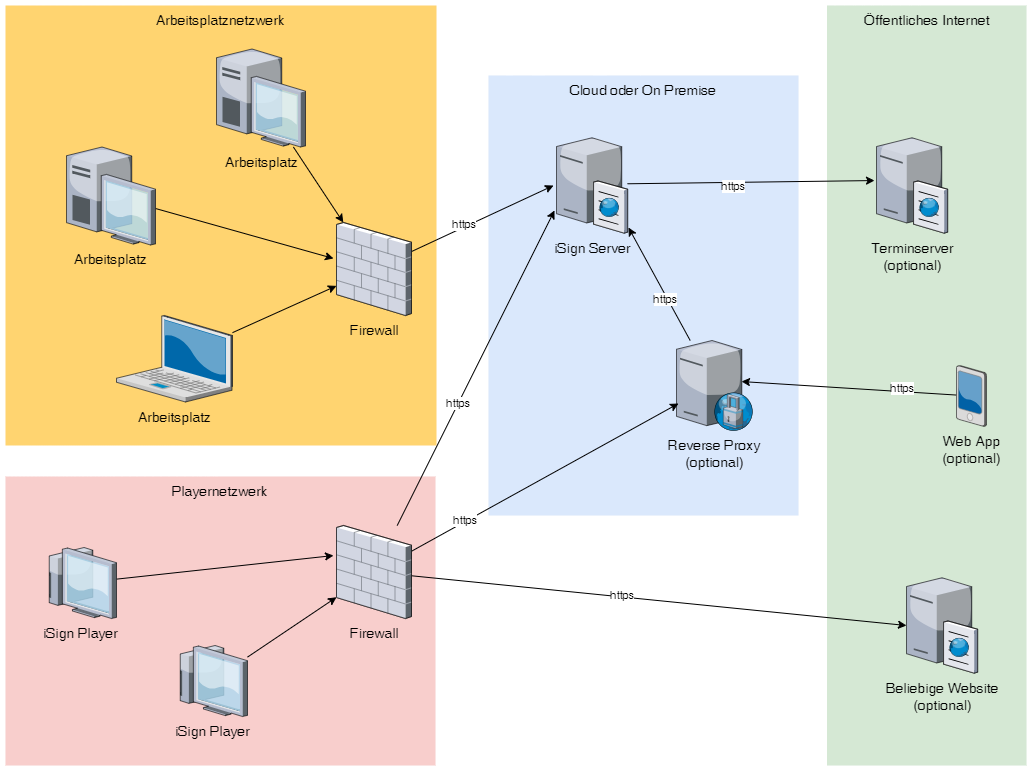
Workstation network: Your existing network for employee workstations.
Player network: The network used by iSign players. It can be the same as the workstation network or completely separate.
Cloud or on-premises: The iSign Server can be hosted in the cloud or on premises. Make sure the connections shown in the diagram are possible. For an on-premises iSign Server with a web app, a reverse proxy is usually needed to route external connections to the iSign Server. A reverse proxy may not be needed for a cloud solution.
Public internet: Connections to the public internet are used, for example, to import data from external servers or use a web app. Players can also display internet content. All of these connections are optional.