Remote Firmware Update
info
This feature is available starting with firmware version 1.2.3.
The update is initiated over MQTT. The EPDs download the update over HTTPS. You can also use your own server to distribute updates.
Requirements:
- An MQTT connection
- Internet access
- Firmware version 1.0.1 or later on the EPD to be updated
Procedure
- Use an MQTT client to connect to the MQTT broker.
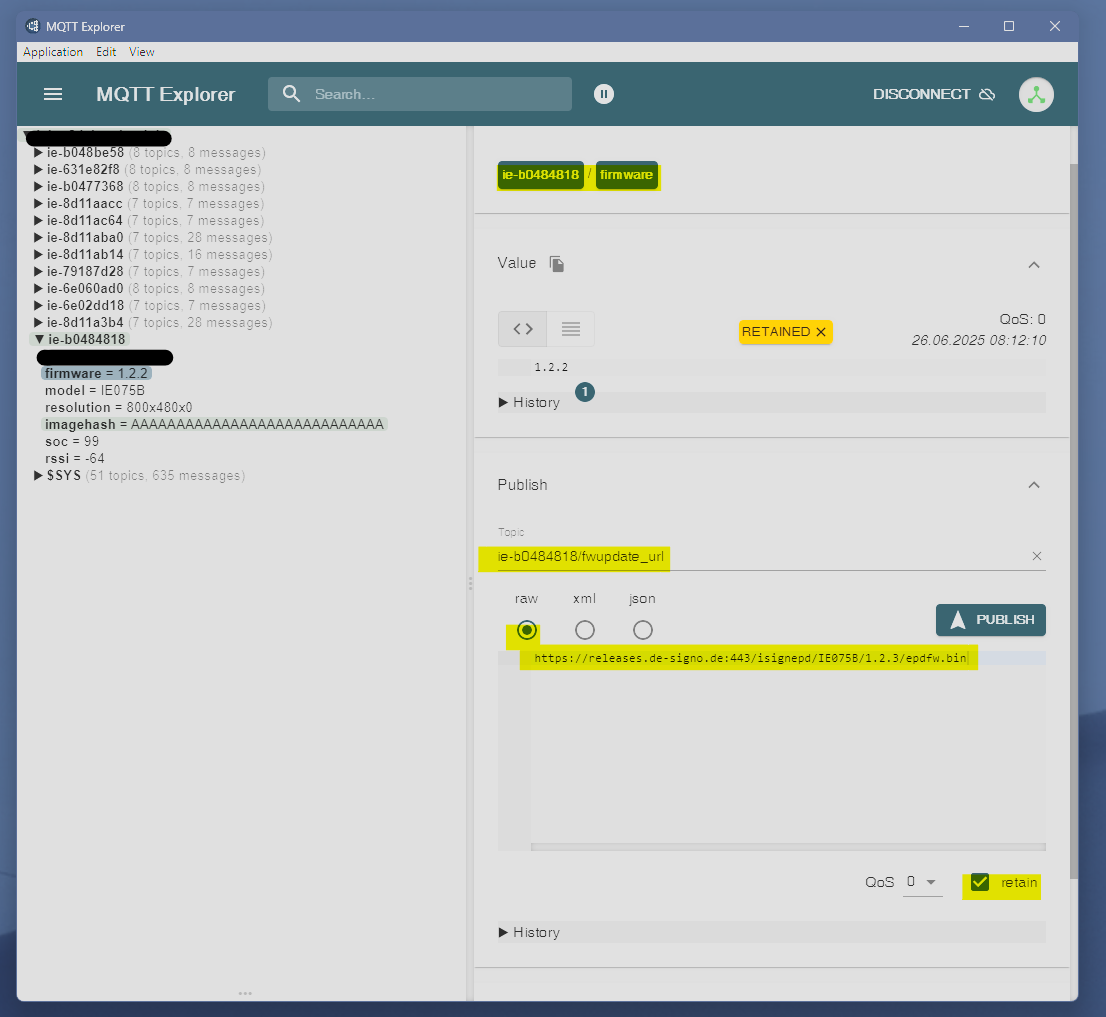
- Publish the following topic for the EPD to update:
Name:ie-ID/fwupdate_url(for example,ie-3ba4f45c/fwupdate_url) - Select raw as the format.
Value: The update URL, for example https://releases.de-signo.de/isignepd/IE042B/1.0.1/epdfw.bin
Retain: Yes - Click Publish.
- Wait for the firmware topic to change or for the
fwupdate_resulttopic to be published. Check the result.
note
Make sure the topic in the Publish section exactly matches the EPD selected on the left. The screenshot values are examples.
Download the Current Firmware
Download the current EPD firmware from the link on that page.