Open and Close Queues
Use this feature to enable or disable ticket issuing at the touch terminal for individual queues. This helps to keep the waiting area under control:
- The waiting area does not become overcrowded.
- Extremely long waiting times are avoided. Customers are not kept waiting only to find that their request can no longer be handled.
Queues can be controlled manually by staff or automatically based on opening hours or a capacity calculation.
While a queue is closed, the terminal does not issue new tickets for that queue, and tickets cannot be forwarded internally to a closed queue.
In urgent cases, staff can still issue tickets directly from the web interface.
Display on the Touch Terminal
A closed queue appears on the touch terminal as follows:
- The department can no longer be selected.
- The button is highlighted in color and shows a notice text.
- The text in the red area can be customized (max. 40 characters). Change it in the template and re-import the template afterwards.
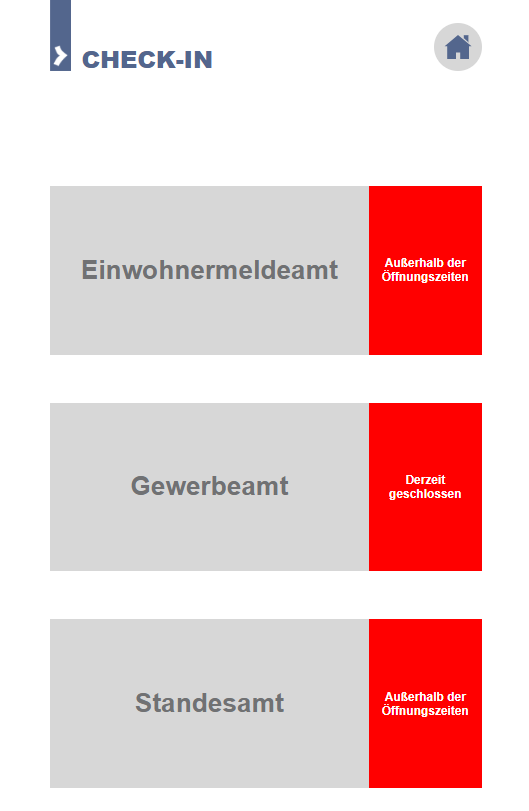
The text shown depends on the reason the queue is closed:
| Reason | Example text |
|---|---|
| Capacity limit reached (dynamic calculation of tickets) | Derzeit geschlossen |
| Outside the defined opening hours | Außerhalb der Öffnungszeiten |
Automatic Control (Administration)
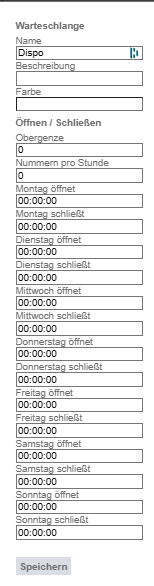
Users with administrator rights configure automatic control under Administration → Vocatis → Queues. The following settings are available for each queue:
Opening Hours
For each day of the week, define when the queue opens and when it closes. Outside these hours, the queue is closed automatically.
Example:
| Weekday | Opening hours |
|---|---|
| Monday | 10:00 – 18:00 |
| Tuesday | 10:00 – 18:00 |
| Wednesday | 10:00 – 13:00 |
| Thursday | 10:00 – 18:00 |
| Friday | 10:00 – 13:00 |
| Saturday | 10:00 – 18:00 |
| Sunday | 10:00 – 13:00 |
Capacity Calculation (Automatic Limit)
The number of tickets that can be issued is calculated individually based on two parameters:
- Tickets per hour: Maximum number of tickets that may be open per hour. If the value exceeds this limit, the queue is closed. Once the number of open tickets drops below this value, the queue reopens automatically.
- Upper limit: Maximum number of currently open tickets, i.e. tickets that have been issued but not yet called. If the number exceeds the defined value, the queue is closed. Once the number drops below the defined value, the queue reopens automatically.
A value of 0 disables the respective parameter.
Example
A queue is open from 8:00 to 18:00, the upper limit is set to 400 and tickets per hour to 100.
- From 8:00, tickets are issued and the number of open tickets increases.
- Around noon, the number of open tickets reaches the upper limit of 400. The queue is closed until the number drops below 400 again.
- In the afternoon, the number of open tickets decreases. During the last hour before closing, the limit of 100 tickets per hour also applies, so that the remaining customers can be served by 18:00.
- At 18:00, the queue is closed according to the opening hours.